

Danger
This only works for Steam players, Ark Survival Evolved servers have NO Mod support for Epic Games players.
Note
Steam Workshop items are downloaded when the server starts, so changes apply after saving and restarting your server.
Using the Steam Workshop Installer Recommended
The easiest way to install mods is directly through the panel.
- 1Log in to Bropanel and select your ARK Survival Evolved server.
- 2In the sidebar, go to
Modsand open theBrowsetab. - 3Search for the mod you want and click
Install. - 4Restart your server.
How To Get Your Workshop Mod IDs
As an alternative, you can install mods by pasting their Workshop IDs directly into your server's Settings. You will need to know how to get a Workshop ID for each mod you want to install. You can view all the ARK Survival Evolved mods here.
Once you find the mod you want you need to copy the URL. Let's use this URL for example: https://steamcommunity.com/sharedfiles/filedetails/?id=3070288532&searchtext=bhop
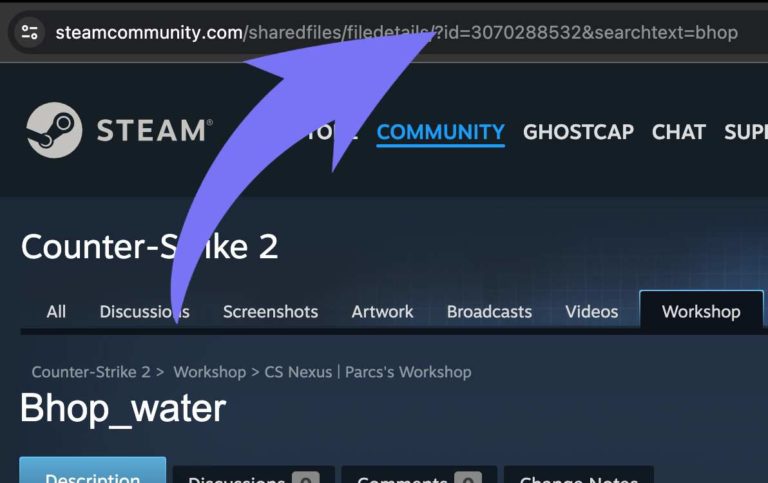 Go to the Steam Workshop page for Ark Survival Evolved, which can be found here.
Installing Mods in Settings
- 1Log in to Bropanel and select your server.
- 2In the sidebar, go to
Settings. - 3Select
Mods. - 4Paste the Workshop ID into
Mods. Example:821530042. - 5Click
Save & Restartto apply your changes.
Tip
For multiple mods, you have to separate each Mod ID with ,. For example: 821530042,731604991